Using Java chassis for cross data center access
Now that you’ve seen two multiple data center architectures of the Service Center, we’ll show you how to implement micro-service cross data center access with the java-chassis framework.
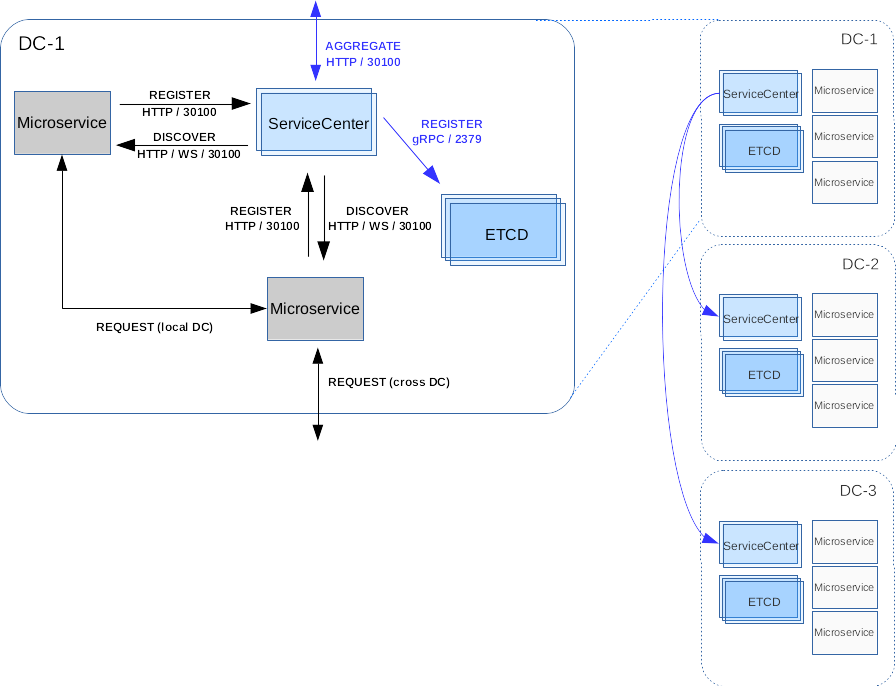
architecture
Quick Start
Let’s assume you want to install 2 clusters of Service-Center in different DCs with following details.
| Cluster | Datacenter | Address |
|---|---|---|
| sc-1 | dc-1 | 10.12.0.1 |
| sc-2 | dc-2 | 10.12.0.2 |
Start Service-Center
Edit the configuration of the ip/port on which SC will run in dc-1. And here we assume your etcd is running on http://127.0.0.1:2379 (you can follow this guide to install etcd in cluster mode.)
vi conf/app.conf
# Replace the below values
httpaddr = 10.12.0.1
discovery_plugin = aggregate
aggregate_mode = "etcd,servicecenter"
manager_name = "sc-1"
manager_addr = "http://127.0.0.1:2379"
manager_cluster = "sc-1=http://10.12.0.1:30100,sc-2=http://10.12.0.2:30100"

# Start the Service-center
./service-center
Notes: + manager_name is the alias of the data center.
manager_addr is the etcd cluster client urls. manager_cluster is
the full Service Center clusters list. + To deploy Service Center in
dc-2, you can repeat the above steps and just change the httpaddr
value to 10.12.0.2.
Confirm the service is OK
We recommend that you use scctl, and using cluster command which makes it very convenient to verify OK.
scctl --addr http://10.12.0.3:30100 get cluster
#   CLUSTER |        ENDPOINTS
# +---------+-------------------------+
#   sc-1    | http://10.12.0.1:30100
#   sc-2    | http://10.12.0.2:30100
Example
Here we show a java example of multiple datacenters access, where we
use an example, assuming that below.
| Microservice | Datacenter | Address |
|---|---|---|
| Client | dc-1 | 10.12.0.4 |
| Server | dc-2 | 10.12.0.5 |
Start springmvc-server
Edit the configuration of the ip/port on which springmvc-server will
register.
vi src/main/resources/microservice.yaml
Replace the below values
cse:
  service:
    registry:
      address: http://10.12.0.2:30100 # the address of SC in dc-2
Run the Server
mvn clean install
java -jar target/springmvc-server-0.0.1-SNAPSHOT.jar
Start springmvc-client
Edit the configuration of the ip/port on which springmvc-client will
register.
vi src/main/resources/microservice.yaml
Replace the below values
cse:
  service:
    registry:
      address: http://10.12.0.1:30100 # the address of SC in dc-1
Run the Client
mvn clean install
java -jar target/springmvc-client-0.0.1-SNAPSHOT.jar
Confirm the multiple datacenters discovery is OK
Since springmvc-client is not a service, we check its running log.
...
[2018-10-19 23:04:42,800/CST][main][INFO]............. test finished ............ org.apache.servicecomb.demo.TestMgr.summary(TestMgr.java:83)